As many of you have found out, Blogger has changed their Word Verification into a (sometimes) very difficult to read formula. This is going to discourage some people from leaving comments. In case you do not know how to change this setting, here are the instructions.
- To remove this step in the posting of comments on your blog Follow the following steps:
1. Go to your Dashboard
 |
| 2. Click "Settings" |
 |
| 3. Click "Comments" |
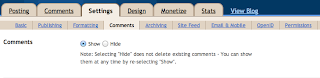 |
| 4. Make sure that "Show" is selected here |
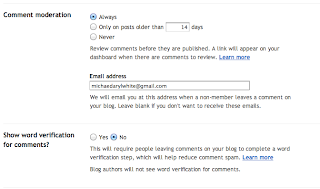 |
| 5. Select "Always" for "Comment moderation" and "No" for "Show word verification" etc. |
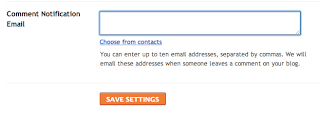 |
| 6. Enter your email address (I use a unique address just for comments) into the provided box and Click on "SAVE SETTINGS" |
And you are done!


